 SniperAssassinGames






























Cooking Corner
Build the restaurant of your dreams while serving hot meals to hungry customers at a really fast pace! Don't let the time run out, practice your time management skills, and experience the craze of real cooking.
Introduction to Cooking Corner
Take charge of your own restaurant empire in this exciting management game. Serve delicious dishes, satisfy hungry customers, and grow your restaurant business.Can you satisfy the cravings of demanding customers and become a top restaurateur?
While it can be challenging due to wait times, brace yourself for a wave of customers as they keep coming in. Get ready for an epic cooking journey!
Features:
- Discover many different new restaurants and cafe's.
- Huge choices of world-famous dishes.
- Beautiful and detailed graphics.
- Multiple challenging and fun levels.
- Addictive cooking and fun gameplay.
Feature List
- Free to play with optional in-game purchases.
- Family-friendly with a 0+ age rating.
- Designed for horizontal play, best experienced on desktop or tablet.
Tips and Strategies
- Figure out what ends your runs most often. The most common failure point is usually the most valuable thing to improve.
- Try the opposite of what keeps failing. If you are playing aggressively and dying, play defensively. If you are playing cautiously and timing out, push forward. The answer is often the reverse of your instinct.
- The scoring system tells you what the designers value. If combos score highest, build combos. If accuracy scores highest, slow down.
- Learn one mechanic at a time. Casual games layer simplicity, and mastering each layer separately is faster than trying to handle everything at once.
- Learn the difference between what costs you progress and what costs you time. Avoiding the first is always more important than optimizing the second.
- Memorize the layout of the play area if the game reuses it. Spatial awareness is an advantage the game will not give you directly.
- Do not restart immediately after a mistake. Play through and see how the game handles recovery. Sometimes there is a comeback mechanic you would miss by quitting early.
- Try playing left-handed if the game allows it (or vice versa). It sounds odd, but changing your input hand can reveal patterns your dominant hand was autopiloting through.
How to Play
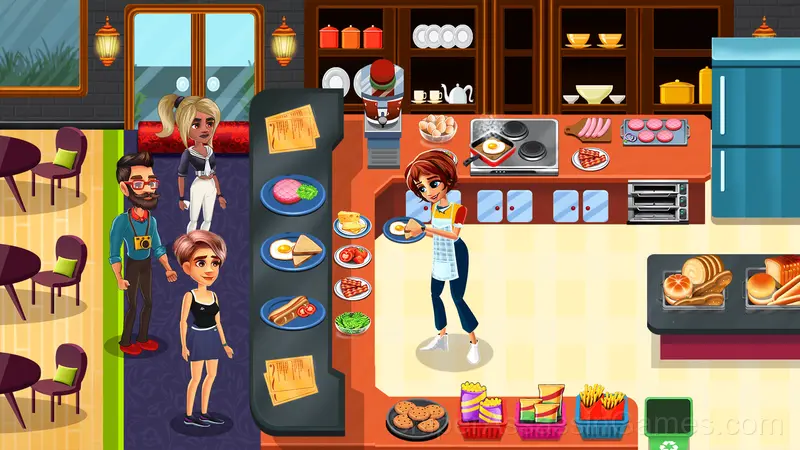
Manage your restaurant by welcoming the customers and quickly taking their orders, Win their hearts by simply tapping and serving them delicious meals right away!
Use the mouse to play this game. Have fun!
Screenshots

Devices That Run Cooking Corner
Browser-based and download-free, Cooking Corner is accessible on Windows, macOS, Linux, ChromeOS, Android, and iOS through Chrome, Firefox, Edge, or Safari. It uses landscape (horizontal) orientation.
Who Made Cooking Corner?
Rendered Ideas made Cooking Corner available for free browser play, originally released in June 2023. It runs on standard web technologies and does not require any plugins, downloads, or installations.
Gameplay Details
The game respects short attention spans without being shallow. Cooking Corner packs meaningful decisions into compact sessions, which is harder to pull off than most developers make it look.
Casual games live or die by their first impression, and Cooking Corner makes those opening seconds count. The core mechanic clicks fast, and the progression system gives you reasons to come back.
Games Like Cooking Corner
More free Casual Games for players who like Cooking Corner. Each one has its own mechanics but fits the same genre:
- Food Truck: Cooking Games
- Fat To Fit
- Avatar World
- Toca World Hack Mod
- Toka Boka Housewarming
- Avatar World Latest Version
- Taba Paws Squish New Year
- Toka World Restaurant
Play Cooking Corner in Your Browser
Cooking Corner is a free browser casual game that delivers on its premise. With 1.1K player reviews and a 4.4 rating, it has the engagement numbers to back up the quality. No download, no signup. Open the page and play.